
Cyber Security Awareness
In this digital age, it is crucial to follow certain guidelines to protect your data from cyber threats. Here are some do’s and don’ts for safe computing:
Do’s:
-
Use Strong Passwords: Always use complex and unique passwords for all your accounts. A strong password should include a combination of uppercase and lowercase letters, numbers, and special characters.
-
Update Regularly: Keep your operating system, browser, antivirus, and other critical software up to date. Software updates often include patches for security vulnerabilities.
-
Secure Your Wi-Fi: Make sure your home Wi-Fi network is secure. Use a strong password and consider using a network encryption protocol, such as WPA2.
-
Backup Your Data: Regularly backup your data. In case of a data loss or a ransomware attack, backups will ensure that your information is not lost.
Don’ts:
-
Don’t Click on Suspicious Links: Be wary of unsolicited emails or messages that contain links or attachments. They could lead to malicious websites or download harmful software onto your device.
-
Don’t Share Sensitive Information: Never share sensitive information such as your passwords, PINs, or Social Security number online or over the phone.
-
Don’t Use Public Wi-Fi for Transactions: Avoid using public Wi-Fi networks for making financial transactions or accessing sensitive information. These networks may not be secure and could expose your data to cybercriminals.
-
Don’t Ignore Security Warnings: If your browser or security software warns you about a website’s security, heed the warning and avoid visiting the site.
Here are some additional safe computing practices:
Do’s:
-
Use a Firewall: Ensure that your computer has a firewall enabled. A firewall acts as a barrier between your computer and the internet, blocking unauthorized access.
-
Install Antivirus Software: Use reliable antivirus software and keep it updated. It can help detect and remove malware from your computer.
-
Use Two-Factor Authentication (2FA): Whenever possible, enable 2FA on your accounts. This adds an extra layer of security by requiring two types of identification before you can access your accounts.
-
Be Aware of Phishing Scams: Be cautious of emails or messages that ask for personal information or direct you to log in to your account. Always verify the source before clicking on any links.
Don’ts:
-
Don’t Download Unknown Software: Only download software from trusted sources. Untrusted software can contain malware.
-
Don’t Leave Your Devices Unattended: Always lock your devices when you’re not using them to prevent unauthorized access.
-
Don’t Use the Same Password for Multiple Accounts: Using the same password for multiple accounts increases the risk. If one account is compromised, all your accounts could be at risk.
-
Don’t Ignore Software Updates: Regularly update your software. Updates often include security patches that fix vulnerabilities.
Social Media
Here are some tips to protect your personal data on social media
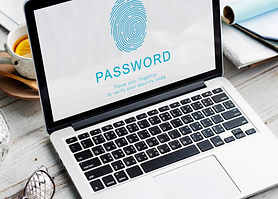
Use Strong and
Unique Passwords
Make sure your password is complex and unique. Don't use obvious choices like birthdays or names. A strong password includes a mix of numbers, letters, and special characters.

Enable Two-Factor Authentication
This adds an extra layer of security to your account. Even if someone gets your password, they won't be able to access your account without the second factor, usually a code sent to your phone.

Limit Personal
Information Shared
Be mindful of the personal information you share in your profile or in your posts. Avoid sharing sensitive information like your home address, phone number, or financial details.

Customize Your
Privacy Settings
Social media platforms have privacy settings that let you control who can see your posts and personal details. Make sure to review and adjust these settings to limit who can see your information.

Be Careful with
Third-Party Apps
Many social media platforms allow third-party apps to access your data. Always check the permissions these apps are asking for and only grant access if necessary.

Think Before
You Post
Once something is posted online, it's hard to completely remove it. So, think carefully before posting anything that could potentially be harmful or embarrassing in the future.

Beware of
Phishing Attempts
Be cautious of suspicious messages or links, even if they appear to be from a friend. They could be phishing attempts to gather your personal information
Phishing
Recognizing a phishing attempt can sometimes be challenging, but here are some key signs to look out for:
Unexpected Emails
Phishing emails often come out of the blue and may claim to be from a company or service you use. Be wary if you weren’t expecting an email.
Urgent Action Required
Many phishing attempts try to create a sense of urgency. They might say your account will be closed if you don’t act immediately.
Spelling and Grammar Mistakes
Legitimate messages usually do not have major spelling mistakes or poor grammar. Read your emails carefully.
Suspicious Links
Hover over any links before you click on them. If the URL doesn’t match the company’s website, or if it is a shortened URL, it might be a phishing attempt.
Requests for Personal Information
Legitimate companies will never ask for personal information such as your password, credit card number, or social security number via email.
Generic Greetings
Phishing emails often use generic greetings like “Dear Customer” rather than your actual name.
Phishing attempts on mobile devices can be a bit different from those on desktops, but many of the same principles apply.
Here are some signs to look out for:
Unexpected Messages
Be wary of unsolicited texts, emails, or social media messages that ask for personal information or direct you to log in to your account.
Urgent or Threatening Language
Phishing attempts often try to create a sense of urgency or use threatening language to scare you into providing personal information.
Suspicious Links
Be cautious of links in messages. If you’re unsure about a link, don’t click on it. Instead, go directly to the website by typing the URL into your browser.
Requests for Personal Information
Legitimate companies will never ask for sensitive information such as your password, credit card number, or social security number via text message or email.
Poor Grammar or Spelling
While not always the case, phishing attempts often contain poor grammar or spelling mistakes.
Calls from Unknown Numbers
Be cautious of calls from numbers you don’t recognize, especially if they ask for personal information. It’s always best to hang up and call back using a number you trust.
If you’ve accidentally clicked on a suspicious link, don’t panic. Here are some steps you can take:
Disconnect from the Internet
To prevent any further damage, disconnect your device from the internet. This can stop any potential downloads or data transmission to the attacker.
Scan for Malware
Use your antivirus software to run a full scan on your device. If any malware is found, follow the recommended steps to remove it.
Change Your Passwords
Start with the account that was targeted, then change other important passwords. Remember to make your passwords strong and unique.
Monitor Your Accounts
Keep an eye on your financial and online accounts for any unauthorized activity or changes.
Report the Phishing Attempt
Report the phishing attempt to your email provider and to the company that was impersonated.
Update Your Software
Make sure your operating system and antivirus software are up to date. Updates often include patches for security vulnerabilities.
Malware
Here are some common signs that your device might be infected with malware:
Slow Performance
If your device is running slower than usual, it could be a sign of malware. Some types of malware use your device’s resources, slowing it down.
Frequent Crashes or Freezes
If your device is frequently crashing or freezing, it might be due to malware. Some malware can cause instability in your system.
Unusual Network Traffic
If you notice a sudden increase in data usage or your device is using the internet more than usual, it could be a sign of malware.
Pop-up Ads and Spam
Excessive pop-up ads or spam messages can be a sign of adware, a type of malware.
Unexpected Software Installs
If you notice new software on your device that you didn’t install, it could be a sign of malware.
Disabled Security Software
Some types of malware can disable your antivirus software or firewall in an attempt to protect itself.
Online Scams
Here are some common online scams to watch out for:

Job Offer Scams
-
Unsolicited emails offering jobs, often unrelated to your expertise.
-
You receive a fake check or money order, and then you’re asked to send back the difference.
-
Always verify checks and avoid sending money back.

Lottery Scams
-
Emails claiming you’ve won a lottery (usually from another country).
-
To claim the prize, you’re asked to pay fees.
-
Be cautious of unsolicited lottery notifications.

Phishing Scams
-
Scammers impersonate legitimate organizations (banks, government agencies) via emails, SMS, or calls.
-
They trick you into revealing personal information or clicking malicious links.

Catfishing & Dating Scams
-
Fake online profiles lure victims into emotional relationships.
-
Scammers exploit trust for financial gain.

Advance-Fee Scams
-
You’re promised a large sum of money but need to pay upfront fees.
-
Avoid falling for promises of easy windfalls